
Tools & workflow
Small Cap Stock Screener: Filters, Scanners and the FennEdge Workflow
Learn small-cap screener filters, compare Trade Ideas, TradingView and Finviz, and follow FennEdge screenshots from scanning to sources and In-Play research.

A search for a small cap stock screener often starts with a simple request: put smaller U.S. companies, lower-float stocks and active names in one list. The harder questions arrive after the list. Did a stock gap at the open or rise later? Is the volume cumulative or concentrated in the last minute? When was the float reported, and has the company issued shares since then?
A useful day-trading screener narrows the universe and makes those follow-up checks practical. This guide uses actual FennEdge screens to show that workflow, then compares the emphasis of Trade Ideas, TradingView and Finviz. FennEdge publishes this article; the comparison uses official product documentation and the captures below, rather than an independent speed or performance test.
Small cap, low float and low price describe different things
Small-cap classifications commonly span roughly $300 million to $2 billion in market capitalization, with different boundaries across indexes and platforms. Day traders often use “small caps” more broadly to include microcaps below $300 million. Set an explicit numerical range instead of relying on the label.
Market cap measures equity size; float describes the shares available for public trading; price is the cost of one share. A $2 stock can have a substantial market cap, while a $20 stock can have a small float. Splits and reverse splits change price and share counts. Review market-cap classifications and price, market cap and float before combining these fields.
Neither small cap nor low float establishes executable liquidity. A large percentage move on little volume can coexist with a wide spread, thin depth and trading pauses. The output is a research shortlist, with no assurance of an executable price or fill.
Define the universe, then read the rankings
In FennEdge Scanner, a Browse panel shows a current ranking; an Alert panel shows events. They answer different questions: “What qualifies now?” and “What just changed?”
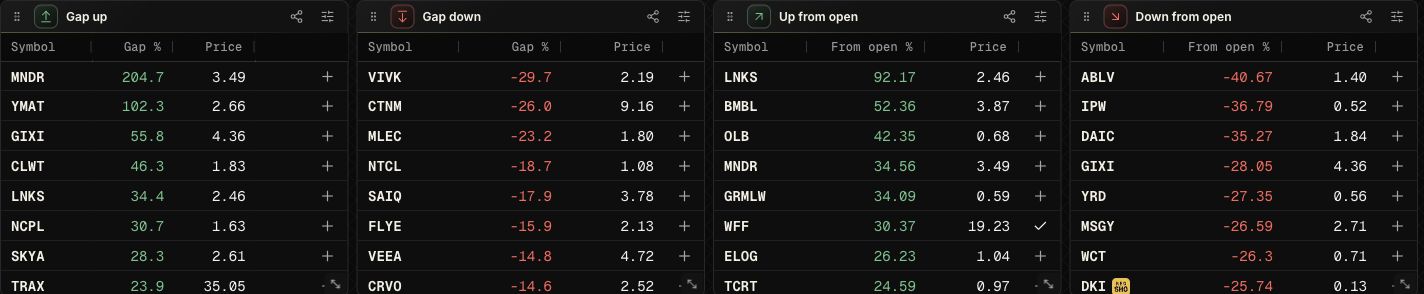
Separate Gap up/down and Up/Down from open panels make an important distinction visible. A stock that gaps and then fades can remain high on a gap list; one that opens flat and rises later can stand out on the From open ranking. During the regular session, FennEdge Gap % compares the official open with the previous regular-session close; From open % compares the latest price with the official open. Before the open, Gap % is an indicative latest-price change versus the previous close and changes basis after the official open. The regular-session screenshot’s Gap % is not a current premarket-price change.
Panel settings select a ranking and independent ranges for security type, price, volume, float and market cap. This illustrative configuration uses common stocks, $1–$20 prices, at least 500,000 shares of day volume and a $2 billion market-cap ceiling. It includes microcaps. These are field examples, not a return-tested strategy; add float limits only when they match the population you intend to study.
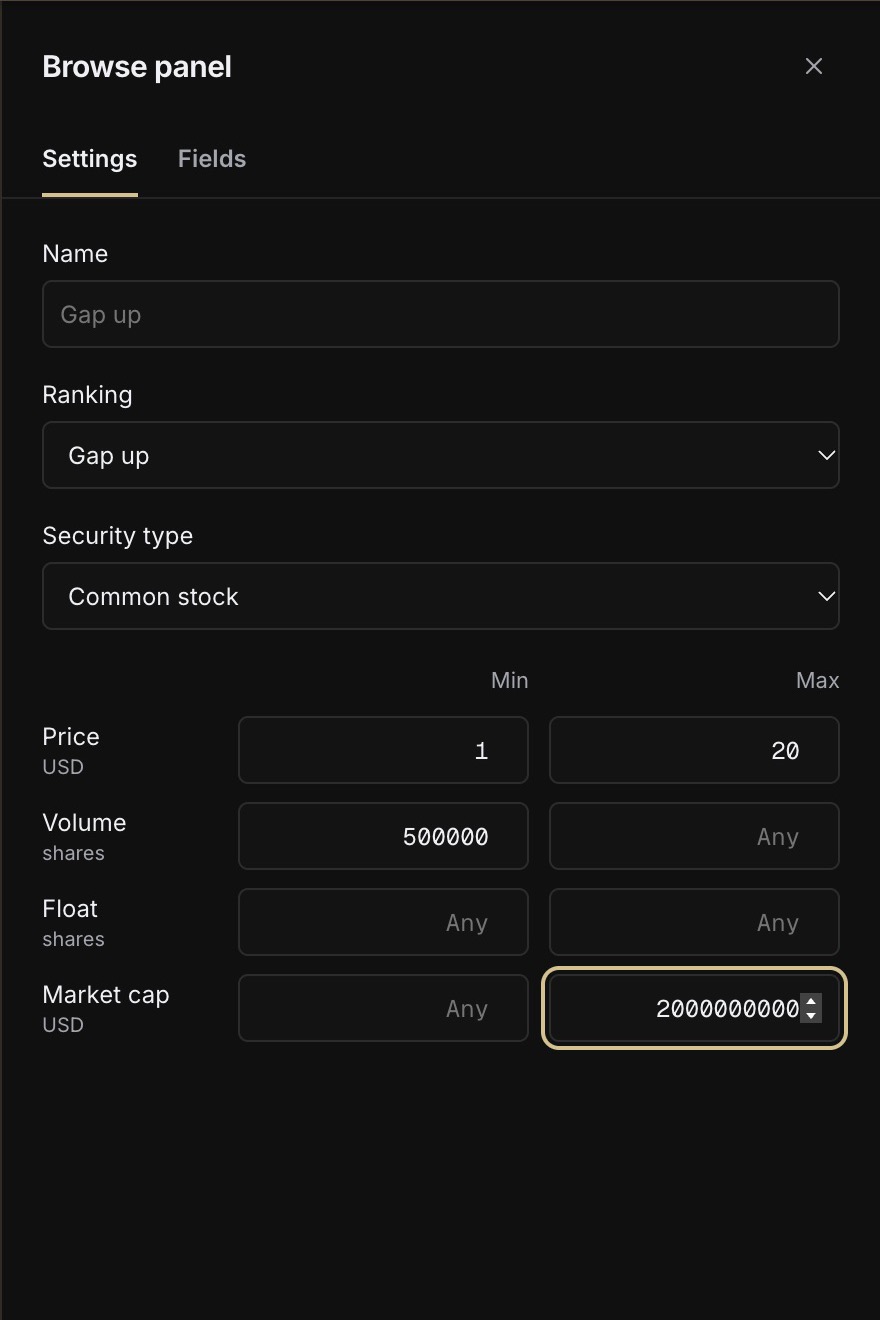
The example deliberately leaves float unbounded: missing or stale float is itself a research issue. Active FennEdge bounds are AND conditions. A missing market cap does not become zero and pass a ceiling. If a name disappears after adding that condition, check whether the reference value is unresolved before concluding that it is too large.
Read activity in its session and data context
Share volume, dollar turnover and relative volume answer different questions. RVOL depends on its baseline; cumulative volume at 8:00 ET is not an equivalent-period comparison with yesterday’s full-day total. Check each provider’s window and session definitions before comparing values.
FennEdge can place volume rankings beside premarket, regular-session, after-hours or full-day high rankings. A high panel shows the observed high relative to the previous close, its price and ET timestamp. That separates earlier strength from a later move. The current high rankings only include names whose observed session high is at least 20% above the previous close, not every stock that made a high.

The status matters. 8 gaps in this capture reports interruptions in observation; highs may be understated. An observed maximum is not a fully backfilled official final high. Rankings and event alerts also use different update paths. These captures cannot establish which scanner is fastest.
Keep intraday alerts inside your research universe
An Alert strategy selects trigger types and adds price, day-volume, float, market-cap and security-type bounds. The capture shows the default Fast rise configuration: a 60-second window, a 3% move and at least 10,000 shares within the window. That window volume is separate from the cumulative Day volume field in the filters below.
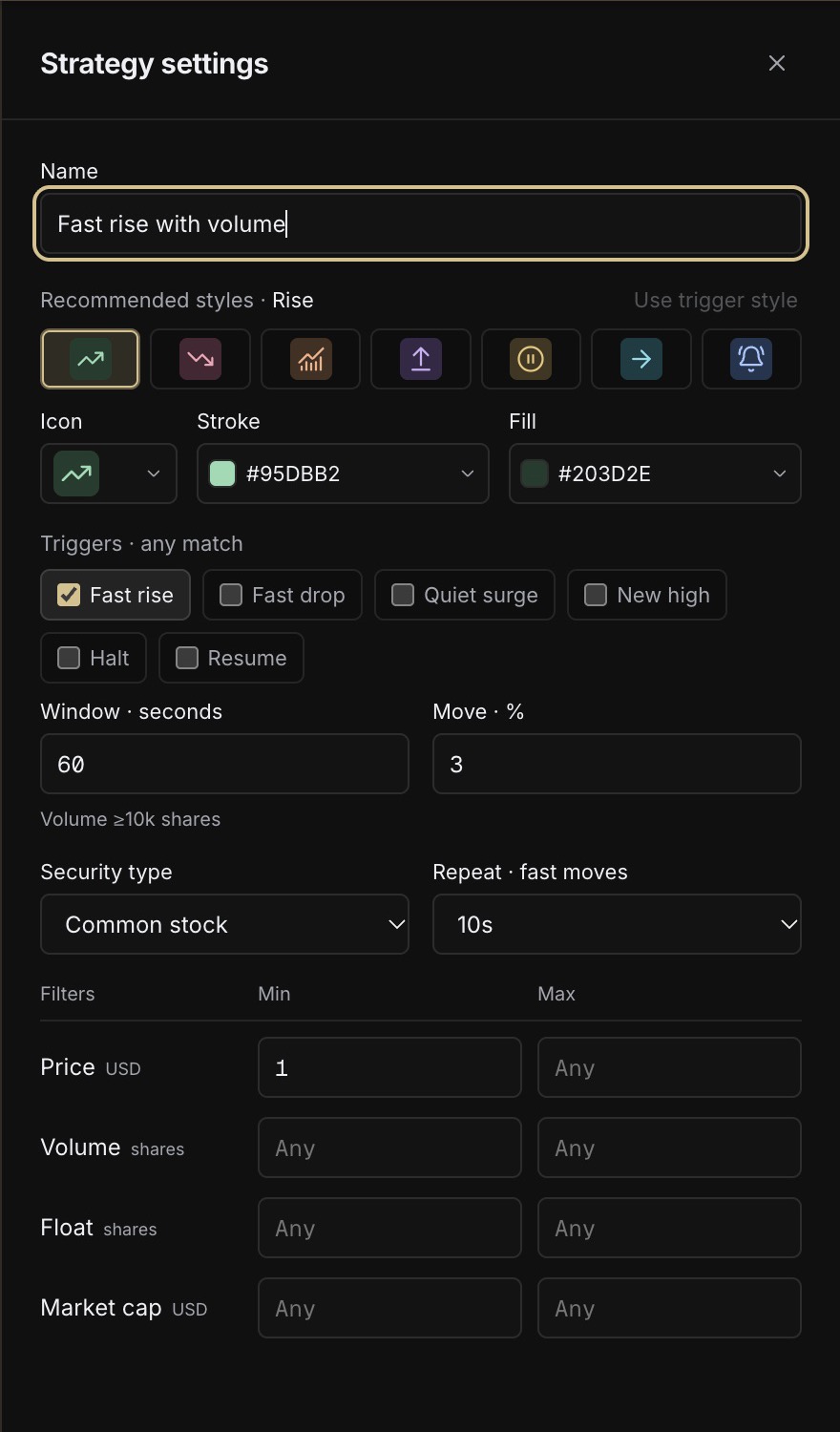
Numeric conditions constrain an individual strategy; multiple enabled strategies can generate their own matches. Event rows show the matched strategy, move, price and ET time. Gap rankings, rapid changes, volume and Nasdaq LULD halt/resume events can sit in the same workspace. Check the selected run mode and browser permission when using sound or background operation.

This is a practical FennEdge advantage: the filtered event stream and the next research step remain in one browser workspace. It does not imply coverage of every exchange’s every halt type, broker execution or automated orders. Read LULD and trading pauses for the trading-interruption context.
Follow a candidate into evidence and historical In-Play Days
Open the ticker research page after spotting a symbol. Check the dates and original links for news and SEC filings, along with the basis for market cap, float and shares outstanding. An older annual share count cannot automatically represent supply after completed financing. For shelf registrations, ATMs, warrants and resales, use the stock-dilution course to work through the documents in sequence.
Next, open FennEdge In-Play Days to compare that ticker’s earlier active sessions. The capture combines WFF’s historical directory with its October 9, 2026 one-minute chart. Dates, Peak %, volume, session labels and the price path can be checked together. It answers how earlier sessions actually developed, without claiming the next move must repeat them.
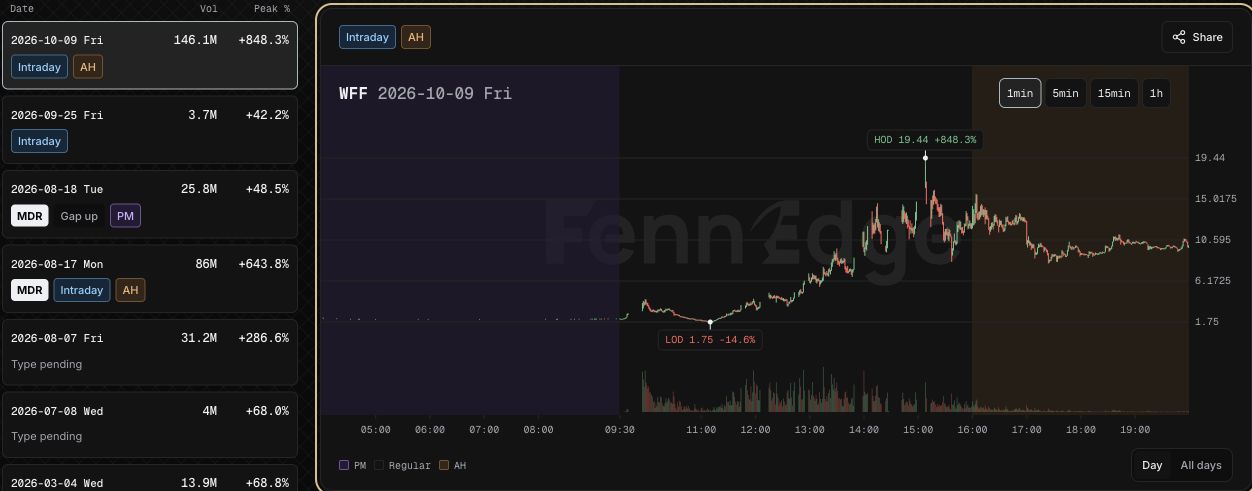
Historical labels, including MDR, can use retrospective classification. Read Partial or unavailable notices when coverage is incomplete. Peak % is not a close-to-close return. Selecting a few impressive rallies is not enough to estimate a strategy’s win rate; record the research question, sample selection and missing dates too. the In-Play Days research guide explains the research method in more detail.
Use the Scanner’s Add to Desk entry to carry a candidate into FennEdge Desk and save your research and plan. After execution, review actual trade records in FennEdge Journal. FennEdge’s advantage is the connected path from discovery to sources, historical comparison and private records, reducing repeated ticker entry and context switching. Private notes and shared market information remain separate scopes.
Trade Ideas, TradingView, Finviz and FennEdge compared
All four can support small-cap research. The main distinction here is workflow emphasis, not a ranking that mixes plan access, refresh speed and profitability. Official feature information was checked on October 13, 2026; confirm current subscriptions and exchange-data permissions with each vendor.
| Product | Documented emphasis | Check before choosing |
|---|---|---|
| Trade Ideas | Intraday alerts, filters and configurable scanning windows for event-driven scans. | Trigger definitions, filter conventions and plan access. Official scan documentation |
| TradingView | Broad fundamental/technical screening, custom tables, charts and Extended hours fields. | Exchange entitlements, auto-refresh and extended-session field availability. Official screener guide |
| Finviz / Elite | U.S. stock screening and visualizations; Elite includes real-time and extended-hours data plus screening notifications. | Free/Elite distinctions, extended hours, filter and export requirements. Official Elite features |
| FennEdge | Scanner panels and filtered intraday events connected with ticker research, In-Play Days, Desk and Journal. | Module access, source timestamps, missing fields and observation gaps. FennEdge plans and access |
If your priority is a wide range of technical scan combinations, test the relevant Trade Ideas definitions or TradingView screening/chart workflow. For broad U.S. equity tables and visual research, compare Finviz. If you focus on U.S. small caps and routinely move from an unusual-activity list into catalysts, share supply and historical intraday research, FennEdge’s connected path directly fits that work. This is a workflow assessment based on the screens above, not proof of lower latency or better returns.
A five-step first configuration
- Define whether the universe includes microcaps, ADRs, warrants or ETFs; set market cap and float separately.
- Choose a Browse panel with a clear question, and record its price, volume and session conventions.
- Set an Alert strategy separately; distinguish window volume from cumulative volume and check audio/run mode.
- Spot-check three to five tickers by opening research, original sources and In-Play history; inspect missing-value behavior.
- Keep candidates in Desk and review execution in Journal after the session, including unremarkable and failed outcomes.
Start with FennEdge Scanner and the illustrated fields, then read the premarket watchlist guide. A good fit lets you explain why a ticker appeared, when the data was observed and which evidence to inspect next.
Frequently asked questions
Is a small cap screener the same as a low float screener?
No. Market cap limits equity size, while float limits publicly tradable shares. Combine them when appropriate, but do not substitute low price or low market cap for low float.
Is FennEdge Scanner free?
Scanner currently serves Plus, Pro and Max members; In-Play Days currently requires Max. Check the plans page and the access shown in your account.
Can FennEdge place the order?
This guide covers scanning, research, notes and review. Execution remains with your broker or trading platform. the day-trading software guide explains the role of DAS, Sterling and supporting tools.
What should I check when a ticker is missing?
Review security type, session, combined conditions and whether market cap or float is unavailable. Ranking limits and coverage also matter. Absence from a filtered list does not establish that a stock did not trade.
This article explains common concepts; examples are not trading recommendations.